Squadpoint Android & iPhone soon

For grassroots youth football coaches

Run match day from the touchline.

Squadpoint picks fair line-ups, times the match from your pocket and tells you who's due a change. You watch the football.

  • Works with no signal
  • Every child's minutes, counted
  • Built by a coach

09:40 · the car park

Kids arriving, whistle in twenty minutes.

Everything before kick-off is a thumb's work: who's here, who starts where, and whether the minutes will come out fair. The app opens on Today, with the one thing to sort at the top.

09:40

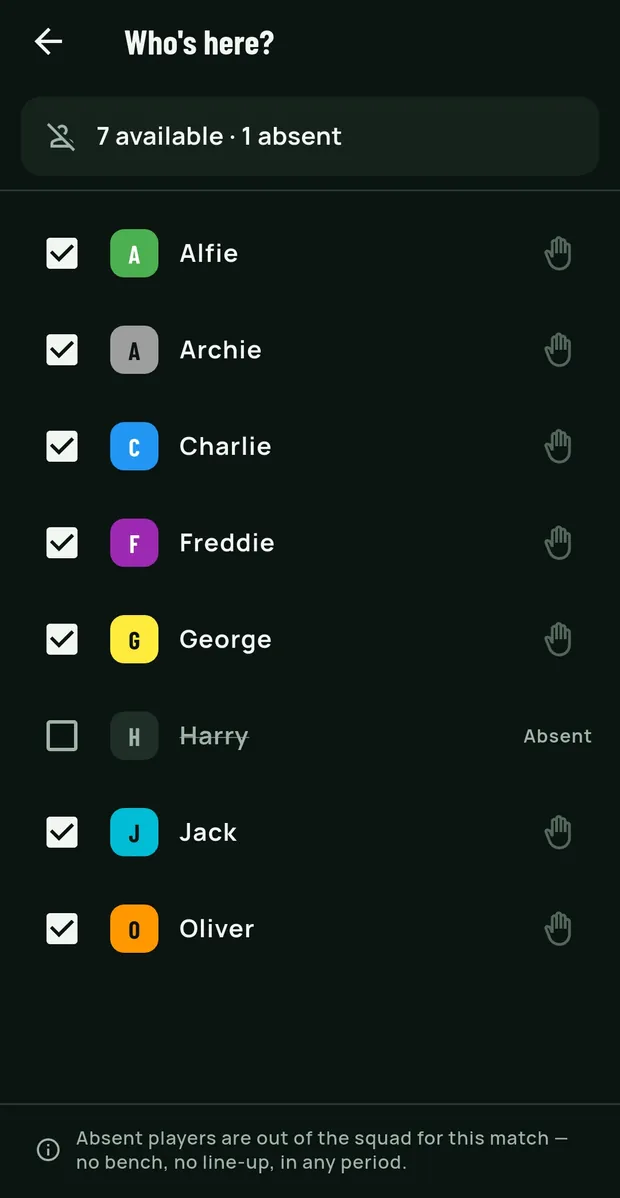
Who's here?

Tick off who has turned up. Absent players come out of today's line-ups, and the match isn't counted against them. A hurt thumb but fine to run around? Tap the hand to keep a child out of goal for this one match, and the app plays them outfield.

Two taps Most weeks someone's ill or away. The plan adjusts without starting again.
09:40
Who's here? Seven players ticked as available and Harry marked absent, each with a hand icon for not in goal today.
09:45

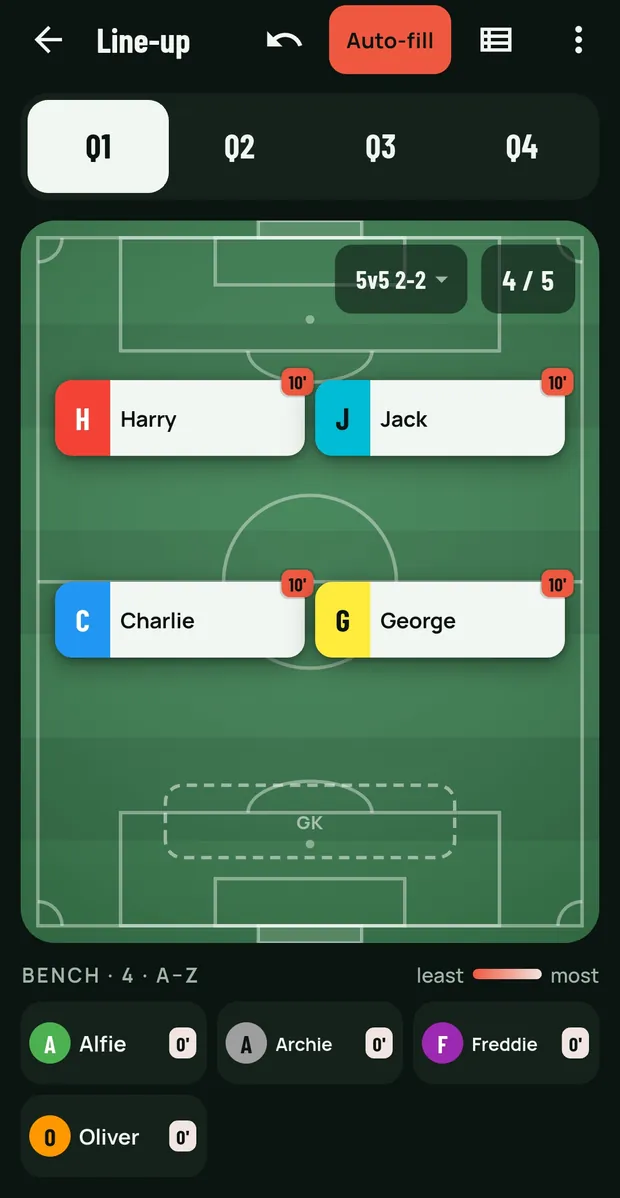
Pick the team on a pitch, in a tap

The line-up opens on a pitch in your formation with a dashed place for every position. Tap a place, tap a player on the bench, done. Drag if you'd rather. Put one too many in a row and it goes in with a warning, never a refusal.

At a glance The Referee page opens it in one tap on the period being played, so mid-match you see the whole team at once.

09:45
The Q1 line-up on a pitch in a 5v5 2-2: four players placed, a dashed GK place still to fill, 4 of 5, and four on the bench.
09:48

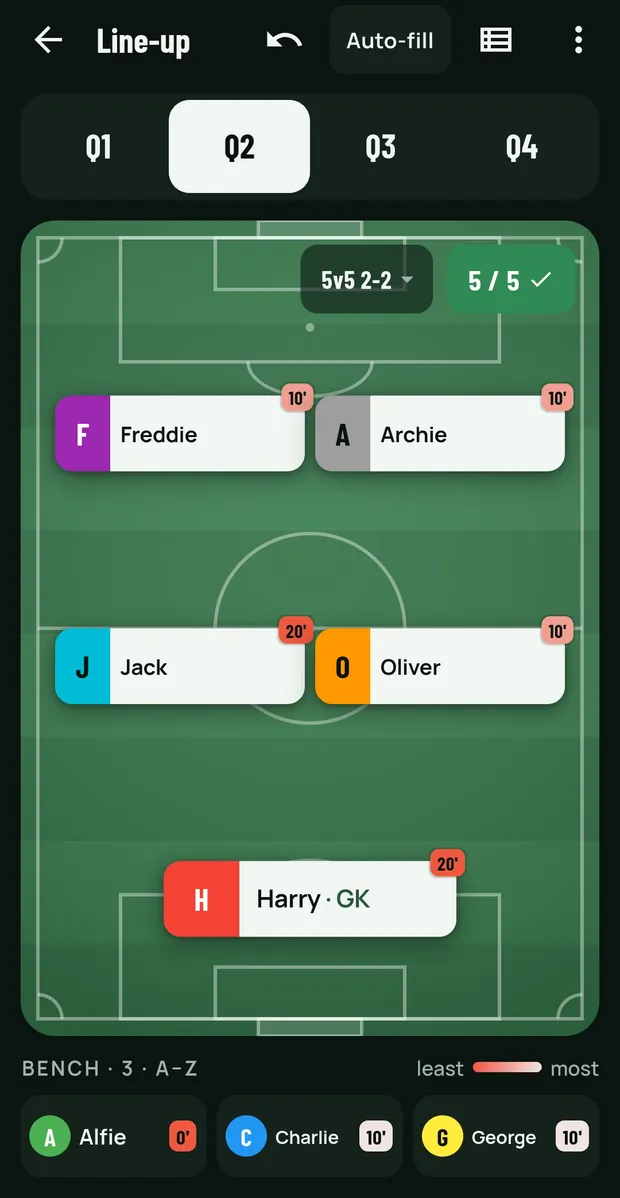
Auto-fill for equal play time

One button fills the period, or the rest of the match, so minutes come out as even as the squad allows. It rotates the keeper, varies who plays where, and gives the odd extra minute to whoever is furthest behind on the season. Every player shows their minutes so far; whoever has had least is picked out in coral.

Two minutes Planning rotations at 09:50 with kids arriving is a quick job, not a spreadsheet.

09:48
The Q2 line-up filled, 5 of 5 with a tick, each player's card showing minutes played, Alfie on the bench with 0 minutes in coral.
09:52

Subs that don't wait for the whistle

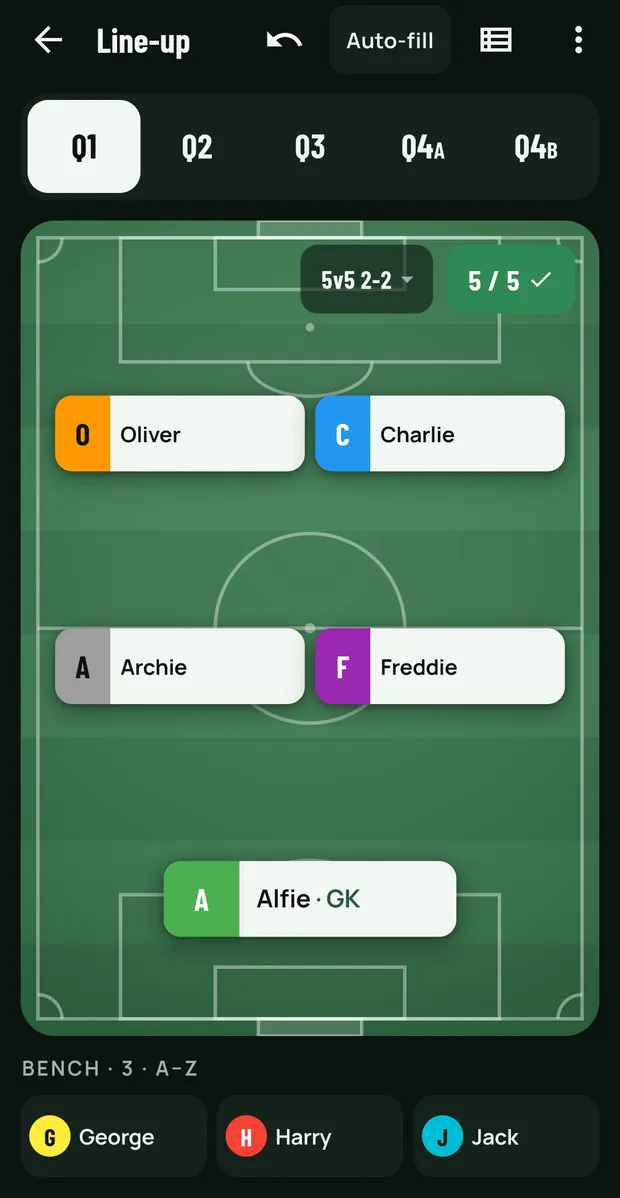
Split any period in two for a change five minutes in. Save the shapes you play, 5v5 2-2 or 7v7 2-3-1, and switch on the morning: when the other coach agrees 6v6 at 09:50, the app re-fills last night's plan for the new shape in one tap and keeps anything already played.

09:52
The line-up tabs read Q1, Q2, Q3, Q4A and Q4B: the last quarter split in two for a mid-period change.
09:55

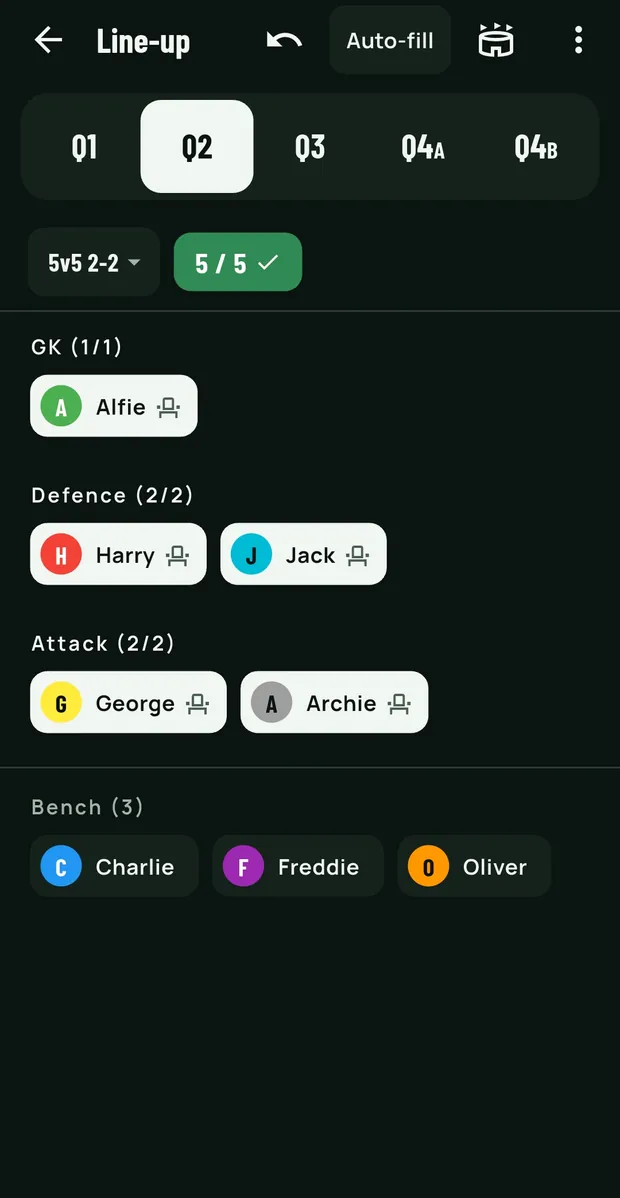
Prefer a list?

The same line-up by position, a seat icon to bench someone, the whole squad on one screen. Undo steps back through every edit, so a stray drag during a hectic warm-up is harmless.

09:55
The Q2 line-up as a list: GK, Defence and Attack with a seat icon beside each player, and three on the bench.
09:40

Also sorted before kick-off

  • A captain for every match, in turn

    Switch on Captain each match and the app suggests whoever is starting and has had fewest turns. If the captain ends up on the bench for kick-off, it warns you.

  • Goalkeeper handled properly

    One keeper per period, rotated by time in goal over the season, or pinned to a dedicated keeper. A child who's a turn behind gets the gloves once, not quarter after quarter.

  • One position per match

    Switch auto-fill to keep each child in one position for the whole match: defence all morning, midfield next week. Minutes stay exactly as even.

  • Team size at a glance

    A badge shows whether the line-up is short, exactly right with a tick, or over. Over is a warning, never a block.

10:00 · kick-off

A clock you can trust in a pocket, on silent.

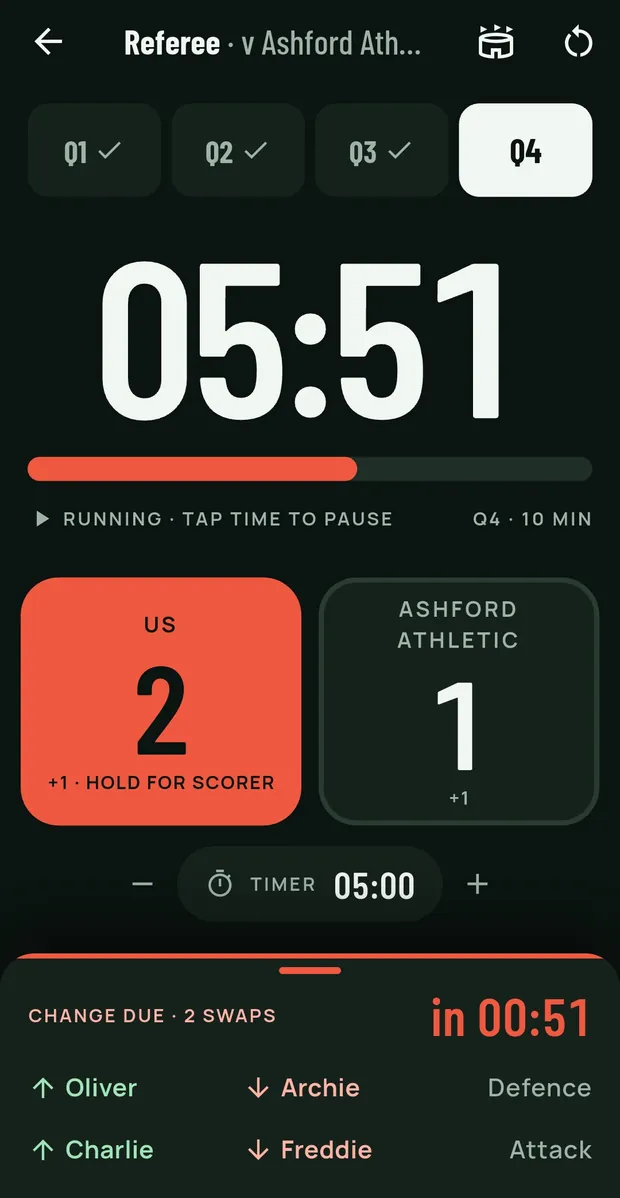
The coach refereeing is also the coach making the subs. The Referee page keeps the time, the score and the next change on one screen you can read at arm's length in bright sun.

Eyes on the game No second timer, no leaving the clock to check who's due off.

05:51
▶ Running · tap time to pauseQ4 · 10 min
Us2+1 · hold for scorer
Ashford Athletic1+1
Change due · 2 swapsin 00:51
↑ Oliver↓ ArchieDefence
↑ Charlie↓ FreddieAttack
10:35
The Referee page: 05:51 left in Q4, a draining bar, the score 2–1 on two big goal buttons, an ad-hoc timer, and a change due in 51 seconds listing who comes on and off.
  • The next change, on the Referee page

    Who comes on, who goes off and the position, one line per swap, with any keeper change first. It stays quiet until it matters, then turns coral a minute out. A sound and a buzz mark the change ten seconds out and on the second.

  • Keeps counting with the phone locked

    The buzzer rides the alarm volume, so it sounds with the phone on silent, and a notification shows the period and time left.

  • Survives the app being closed

    If the phone kills the app mid-match, or the battery dies, the clock comes back where it was. Hours later, it reads the match as finished rather than resuming a stale countdown.

  • Gala days: a clock per match

    Every match keeps its own clock, so you can prepare game three while game two is still being played. Opening the next one never resets the one being timed.

  • Put the clock back in step with the ref

    Forgot to start it, or the ref blew early? Pause, and drag the bar to where the game really is, to the second. Drag it to the end and one tap blows the whistle.

  • The clock follows you round the app

    A running clock shows as a small pill on every screen. Plan the next quarter's line-up while it counts, then tap the pill to get back. A second ad-hoc timer covers a sin bin or a drinks break.

10:36 · a goal

Who scored, and who set it up

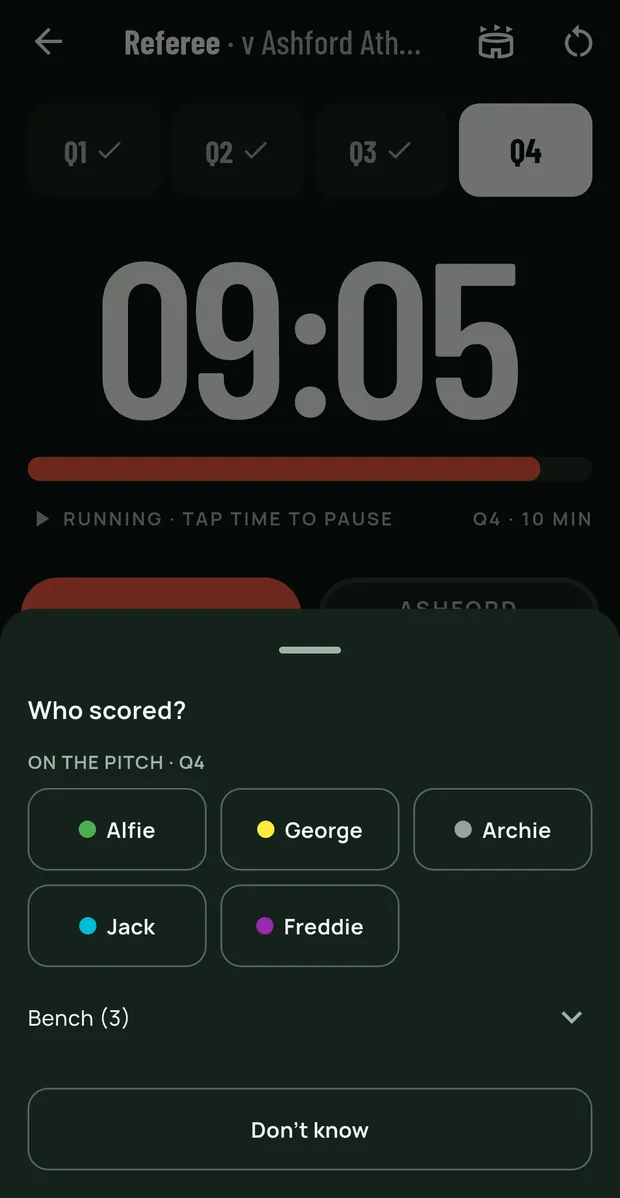
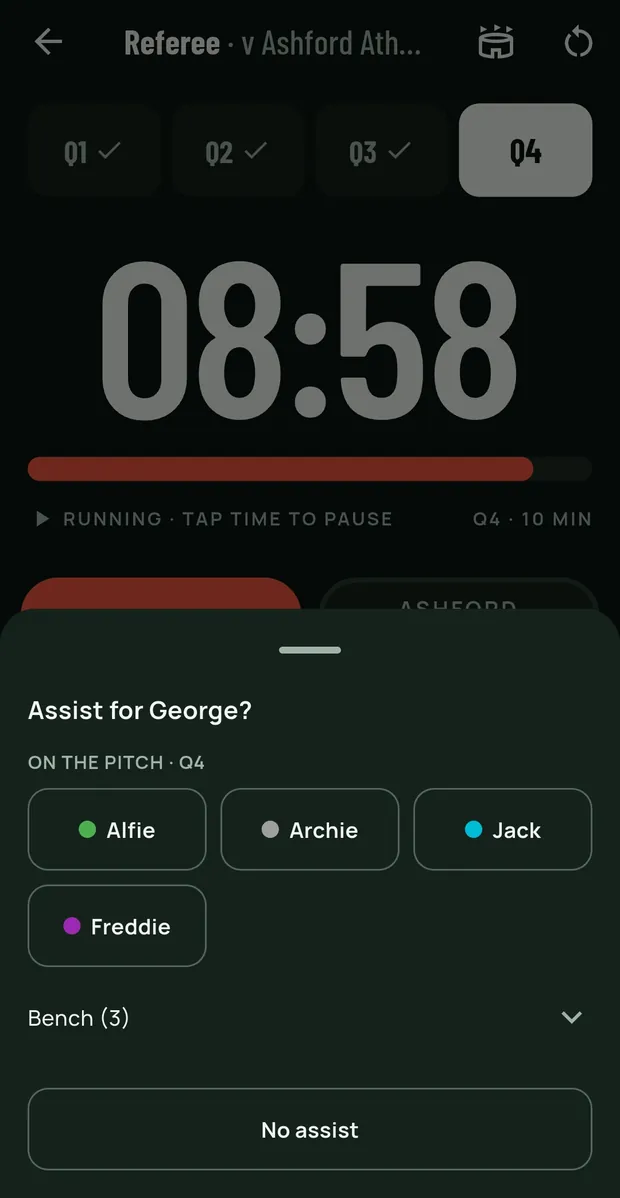
Tap for a goal. Long-press to pick the scorer from the players on the pitch, and you're asked for the assist straight after: one tap on a name, or swipe it away. The minute is taken when you press, not when you pick the name. Nothing on the page moves the goal buttons, so they can be hit without looking.

Never slower Recording the scorer never slows down recording the goal, and a mis-tap is one undo away.

10:36
Who scored? A sheet over the running clock listing the five players on the pitch in Q4, with a Don't know button.
Who scored?
10:36
Assist for George? The other four players on the pitch, and a No assist button.
…and the assist, straight after.

Half-time maths

Fair minutes for every child. The maths is done.

Equal time is the rule in youth football, and it's harder than it looks across four quarters, a keeper and a child who went home at half-time. Squadpoint does the arithmetic. You keep the final say.

This match, lane by lane

AAlfie
DefenceAttackDefence
30'
AArchie
GKAttackDefence
30'
CCharlie
Absent
–
FFreddie
AttackDefenceGK
30'
GGeorge
DefenceGKAttack
30'
HHarry
AttackDefenceAttack
30'
JJack
AttackDefenceGK
30'
OOliver
AttackDefence
20'

The season, fairly counted

11:02
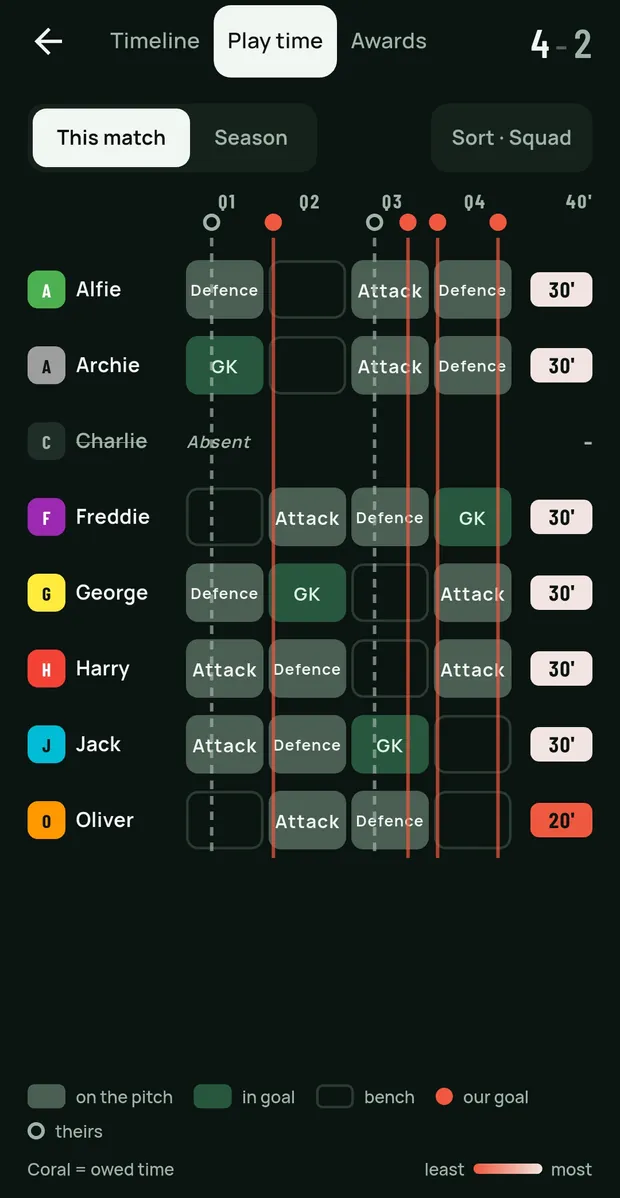
Play time for one match: a lane per player showing each quarter they played and where, with the goals drawn through every lane and totals as minute chips.
Each quarter, and where: in goal, in defence, on the bench. A mid-quarter sub is a split block, and our goals run down every lane. Turn the phone sideways and the whole squad fits, or sort by least played.
11:02
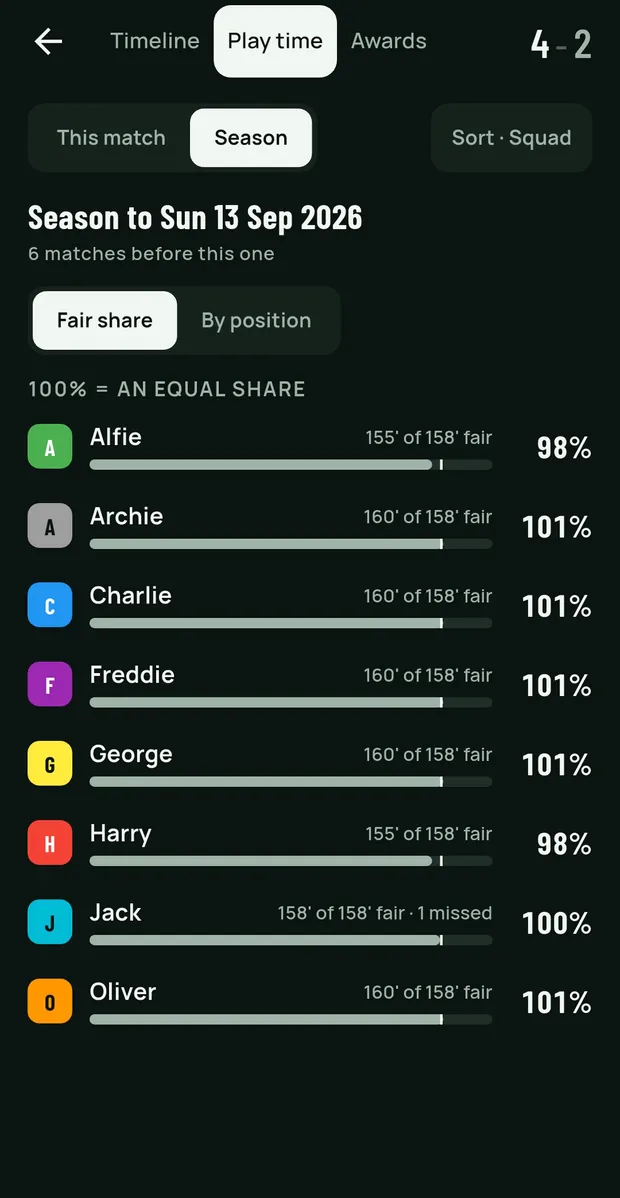
Season play time: each player's share of their fair minutes as a bar, 98 to 101 percent, with Jack's one missed match noted.
Fairness is judged over a season, not one Sunday. A child back from injury isn't pushed onto the pitch to catch up.
11:02
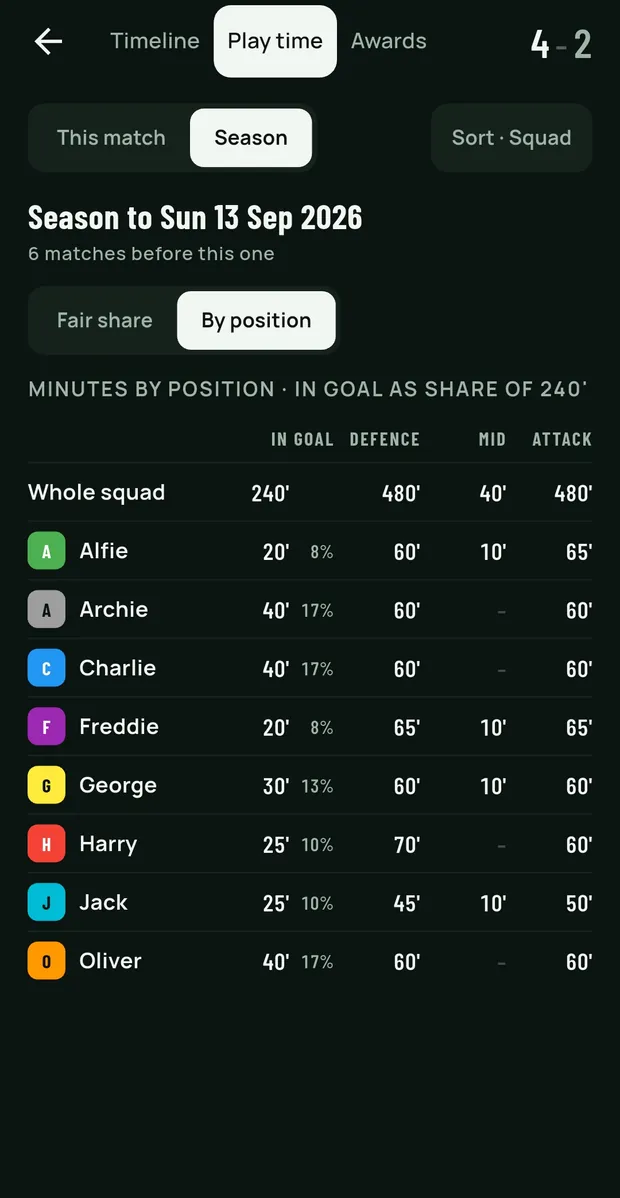
Minutes by position for the season: in goal as a share of the time in goal, then defence, midfield and attack for each player beside the whole squad's.
Minutes in goal and in each position, each child's beside the squad's, so you can see the rotation working.

Full time

"Who got our goals?" Answered before the parents ask.

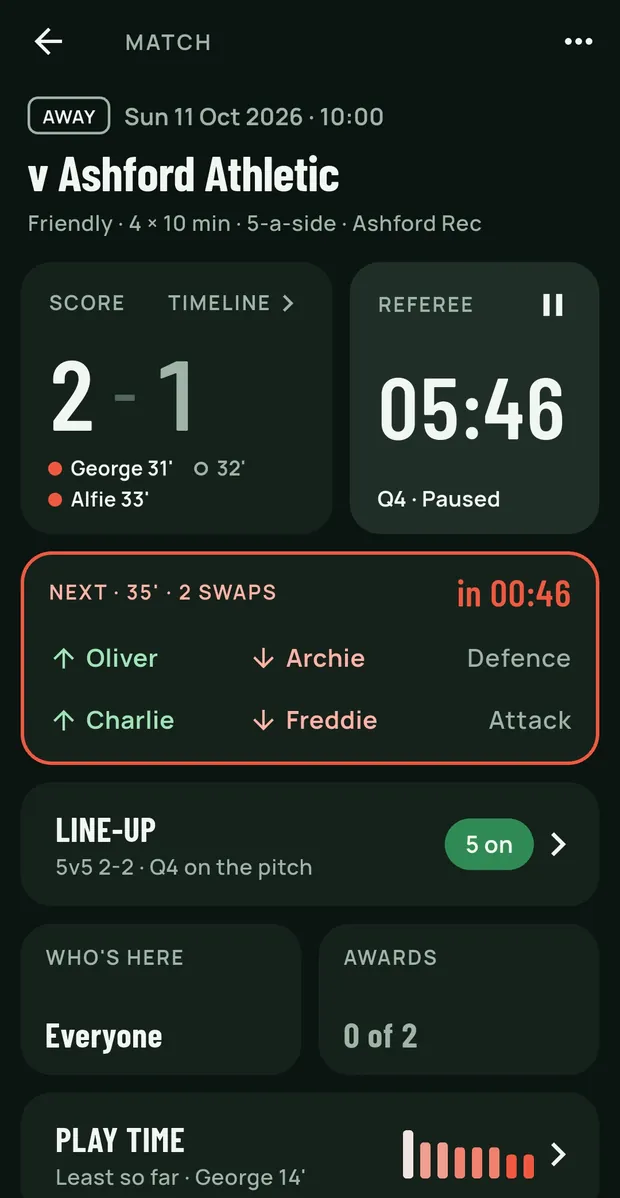
One screen per match that rearranges itself for where the game is: a to-do list before kick-off, the score and the next sub during, the awards and the minutes after. The thing to do next is always at the top.

10:41
The match screen mid-match: score 2–1 with the scorers under it, the clock paused at 05:46 in Q4, and the next change in 46 seconds outlined in coral with who comes on and off.

During

The match screen changes with the match

Once the clock runs, the score and the countdown grow, the clock turns coral, and the next substitution sits underneath: who comes on, who goes off, how long until it.

10:52
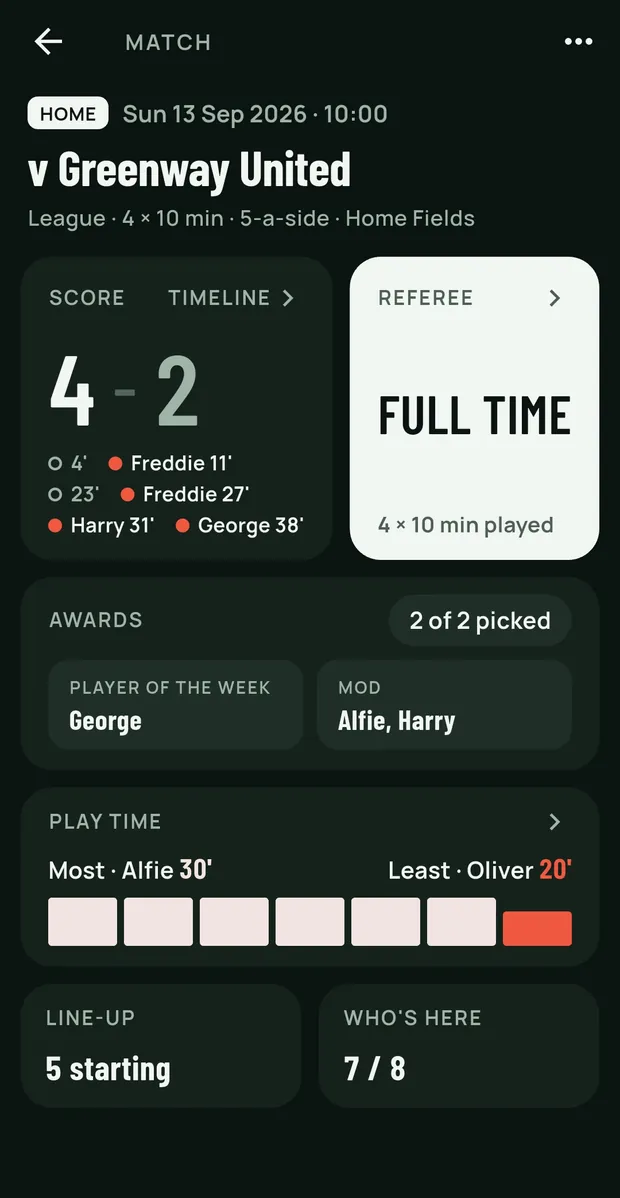
The match screen at full time: 4–2 with every scorer and minute, a paper FULL TIME card, awards 2 of 2 picked, and play time most to least.

Full time

Who scored, right under the score

Every goal with the scorer and the minute, ours and theirs told apart at a glance. A match nobody kept score in shows no score at all, rather than a 0–0 that never happened. Play time runs most to least, with the child owed the most picked out.

10:54
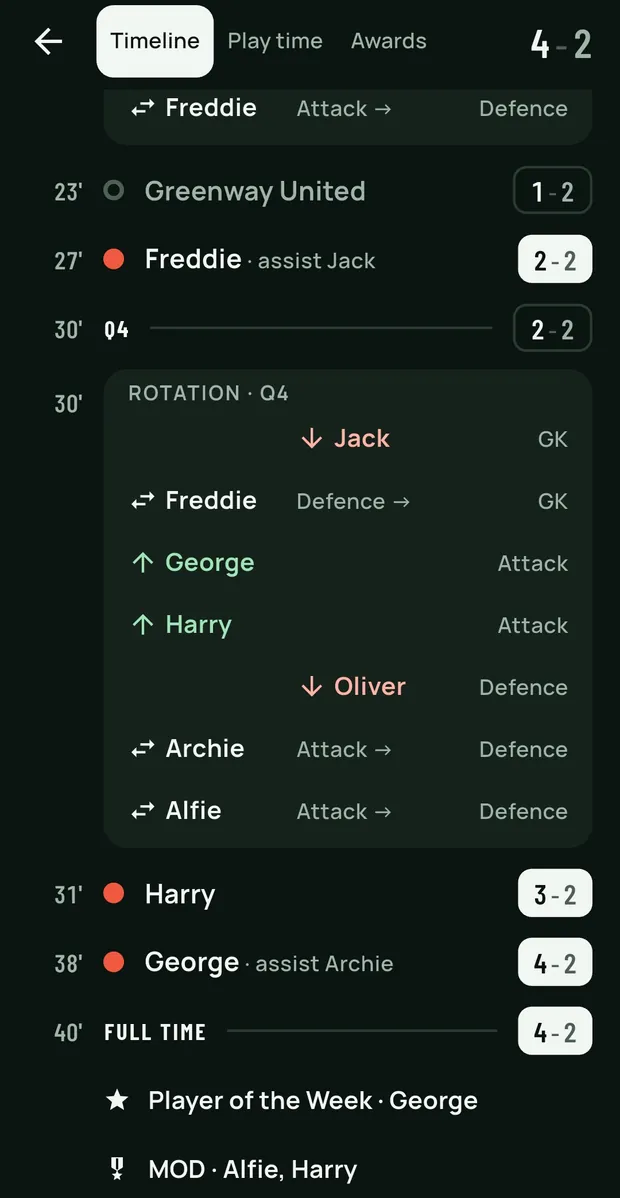
The match Timeline: goals with scorer and assist and the score as it stood, the Q4 rotation with who came on and off and where, full time, and the awards.

The Timeline

What happened, in one scroll

Our goals with the scorer and the assist, theirs marked apart, every rotation and mid-period change, each whistle with the score as it stood. Tap Edit and any goal can be given the minute it really went in, the right scorer, or the other side. Works mid-match too.

10:56
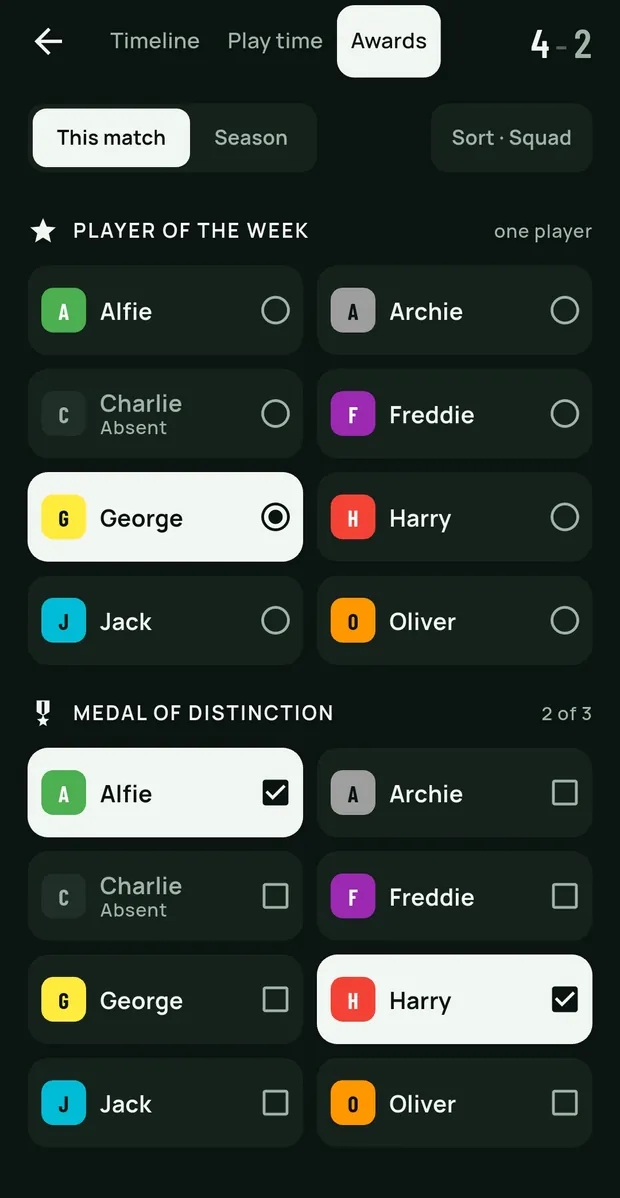
Picking awards: Player of the week as a grid of the squad with George chosen, then Medal of distinction, 2 of 3 picked, with Alfie and Harry ticked.

Awards

Player of the match, and your own

Define your own awards, up to three medals, each with its icon, in the order you hand them out. Pick winners after the whistle with the minutes in view, from a grid where a tap picks. The picker can list who has had fewest first.

10:57
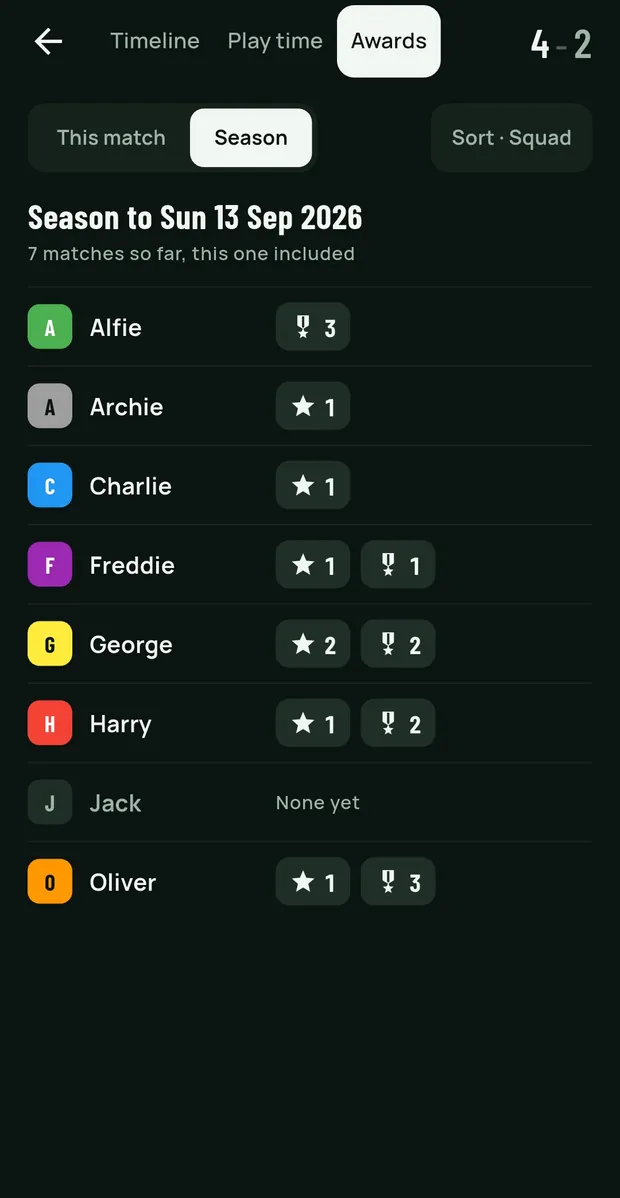
The season's awards: each player with a count of Player of the week stars and medals; Jack has none yet.

The season

Awards that go round

A season tally shows who has won what, so the award goes to the child who hasn't had one yet. In youth football, the award should go round.

Midweek

The whole season, in seconds.

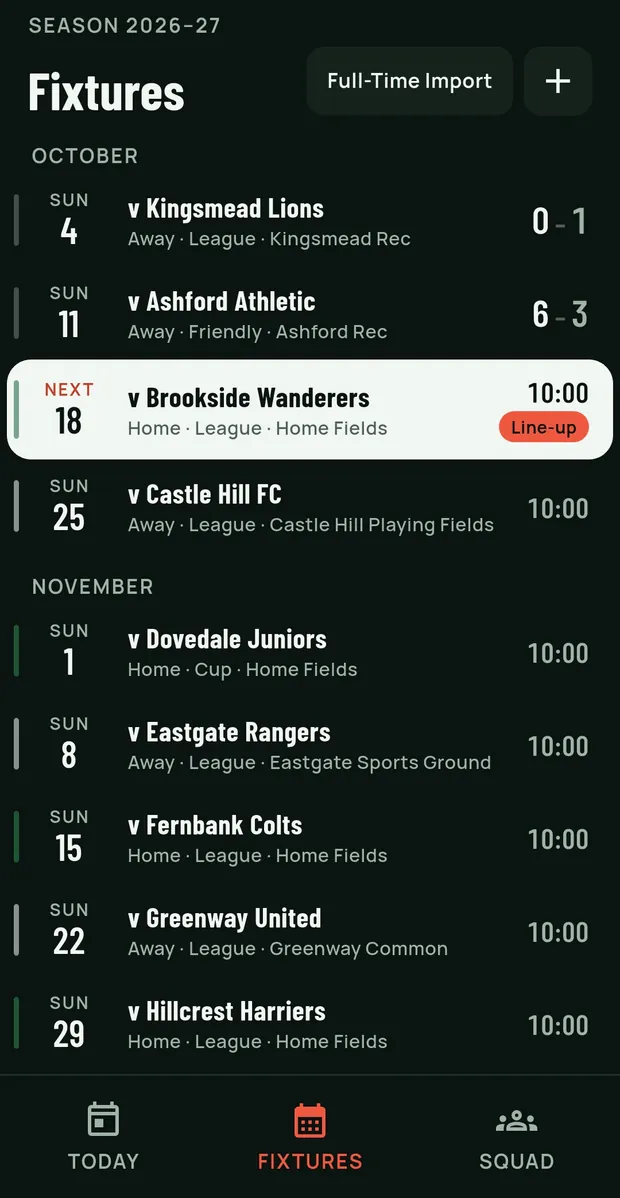
Fixtures from The FA's Full-Time in one tap, a term of friendlies in one go, and a season you can read without reading every row. Today, Fixtures and Squad are one tap apart along the bottom.

19:04
Fixtures for the season, under October and November, each row with the date down the side: results read ours-first, the next match stands out with a Line-up nudge, and a bar down each row's edge marks home and away.
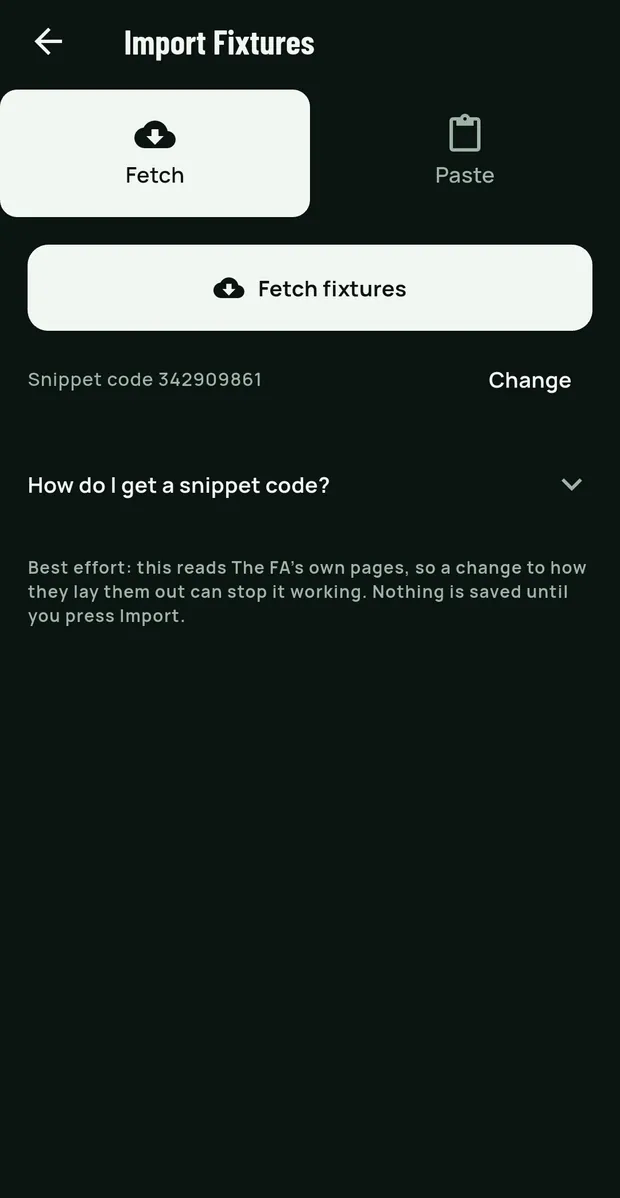
  • Fetch fixtures from FA Full-Time

    One tap pulls your team's fixtures from The FA's Full-Time, with a step-by-step guide to the snippet code. Opponent, home or away and venue are included. Pasting a listing works too.

  • Re-import without losing work

    Fetch again and the app shows exactly what changed, "Away to Home" or a new opponent, and applies only what you tick. Your line-ups are kept, and a kick-off time you agreed with the other coach isn't overwritten.

  • A nudge before your code expires

    Today and the Fixtures page remind you to refresh after a fortnight, more firmly as Full-Time's 30-day expiry approaches, so call-offs and rearrangements come in without you remembering to check.

  • A season you can read at a glance

    Fixtures under their month, the next one standing out while nobody has been picked, a match nobody kept score in just saying "Played". A gala day is a single row that opens onto its games.

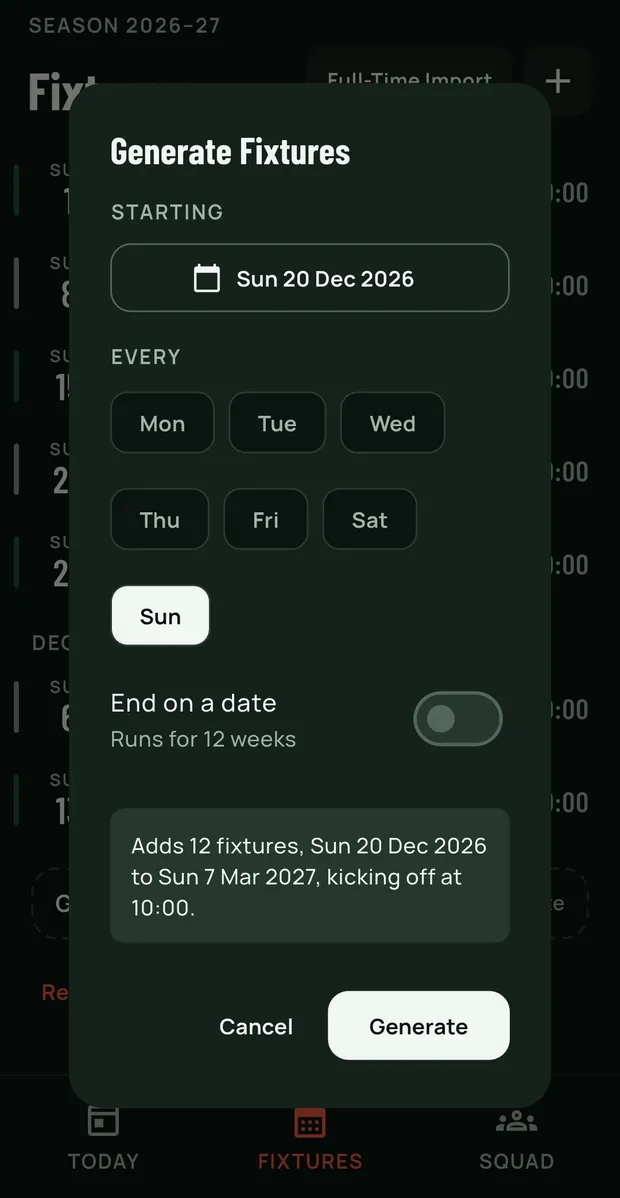
  • Generate a block of fixtures

    Lay down a term of weekly friendlies in one go, then remove the untouched ones in one press if plans change.

  • Every match on a gala day, one tap away

    Today shows a card for each match in kick-off order, played, being timed or still to play, so you always know which game you're in.

19:05
Import Fixtures: Fetch or Paste, a Fetch fixtures button, the saved snippet code, and a guide to getting one.
Fetch from Full-Time, or paste a listing.
19:04
Generate Fixtures: starting Sunday 20 December, every Sunday, running for 12 weeks, adding 12 fixtures kicking off at 10:00.
A term of weekly fixtures in one go.
19:03
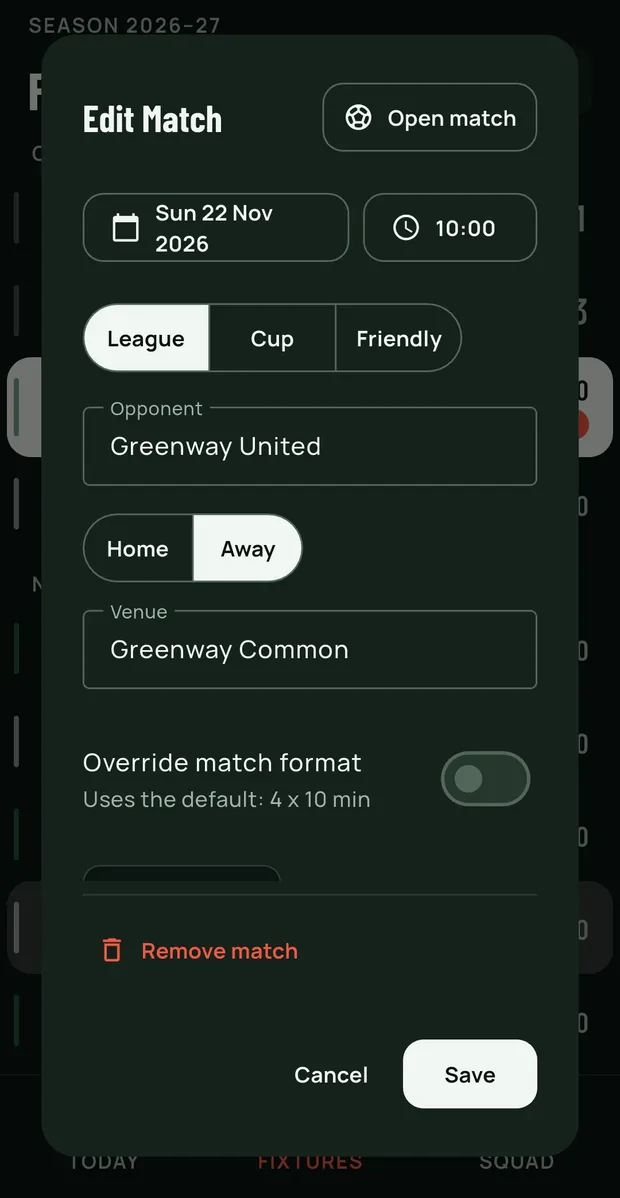
Edit Match: date and time, League, Cup or Friendly, opponent, Home or Away, venue, an optional format override, and Open match at the top.
Tap a fixture to edit it, with Open match at the top of the same sheet.

Your data

A season's work, kept.

Export one match or the whole season to a file or the clipboard, and import it back on the same phone or a new one. A new phone or a reinstall doesn't cost you the season.

  • Backup and restore

    Everything a match needs travels with it: the squad, the positions and the format, so a line-up reads the same on the phone it lands on.

  • Children's names stay yours

    The app asks for nothing it doesn't need. What it keeps and why is in the privacy policy, in plain words.

  • No ads, no analytics, no tracking

    Nothing in the app watches what you do, and nothing interrupts a match to sell you something.

  • Never sold, never shared

    Your squad's data is yours. It is never sold and never passed to anyone else; if you one day share a squad with a fellow coach, that is your doing, not ours.

  • Works with no signal

    Pitches don't come with Wi-Fi. Every part of match day, the clock, the line-up and the changes, works with the phone in flight mode.

Built by a coach, on a touchline, for the coaches who kept asking.

Squadpoint started as one team's Sunday-morning tool and grew because the coaches at the next pitch wanted it too. It's opinionated about the things that matter in youth football and quiet about the rest.

Coming soon toGoogle Play Coming soon tothe App Store

Looking for the kickabout organiser?

The Squadpoint web app for organising your own weekly game lives at squadpoint.com. This site is for the coaching app.

Go to squadpoint.com
Q110:00